A KSeF invoice.In half a minute.
Issue it from your iPhone. Signing, sending and the UPO happen on their own. You sign in with Apple and connect the company once — with a KSeF token, a Trusted Profile or a qualified certificate. Face ID locks the app; it is not the front door.

Ksefly is an independent third-party application and is not affiliated with, sponsored by or endorsed by the Polish Ministry of Finance, the National Revenue Administration or any other government body. The name KSeF is used descriptively only.
01
The date
KSeF isn’t coming.It’s here.
The National e-Invoicing System is compulsory: for the largest sellers since February, for everybody else since 1 April 2026, and every business has been receiving its purchase invoices through it since February too. If you issue invoices, you issue them in KSeF. The only open question is what you issue them with.
- Took effect for businesses whose 2024 sales exceeded 200 million złoty — and receiving invoices through KSeF became everyone's duty. 1 February 2026
- Took effect for everyone else, sole traders included. 1 April 2026
- The transitional reliefs end: invoicing outside KSeF under 10,000 złoty of sales a month, the deferred KSeF number on transfers, and the deferred penalties. 1 January 2027
Checked on 22 August 2026 · source: podatki.gov.pl. The dates are set by the Polish Ministry of Finance and its own page is the binding one — we re-read it regularly, but read it yourself before you act on this.
02
Issuing
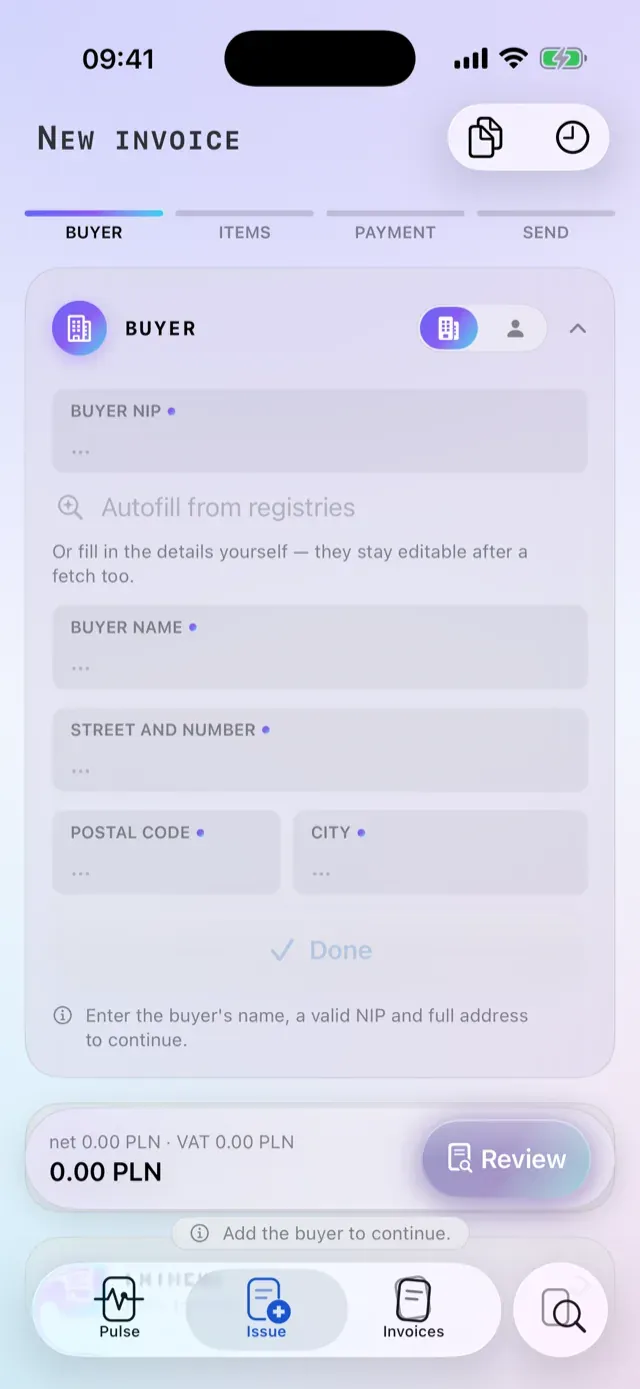
You type the amount.The number writes itself.
An FA(3) invoice comes together on one screen: the customer and the goods suggest themselves from your books after three letters, amounts work from gross or from net, and foreign currencies take the National Bank rate for the day before the sale. The number follows the scheme you picked, and starts over by itself when the period turns.
- Document schemaFA(3)
- Validationofficial XSD, in CI
- Proven on the KSeF sandbox6 document shapes
- Exchange rateNBP, day before the sale
A correction isn’t a crisis.It’s one document.
Ksefly issues a real KOR correction with its reason and a reference to the original, numbers it FKV/⟨original number⟩/01, and links the pair server-side. The original steps out of the list while search still finds it, and the money is counted once rather than twice.
03
Costs
Costs walk inby themselves.
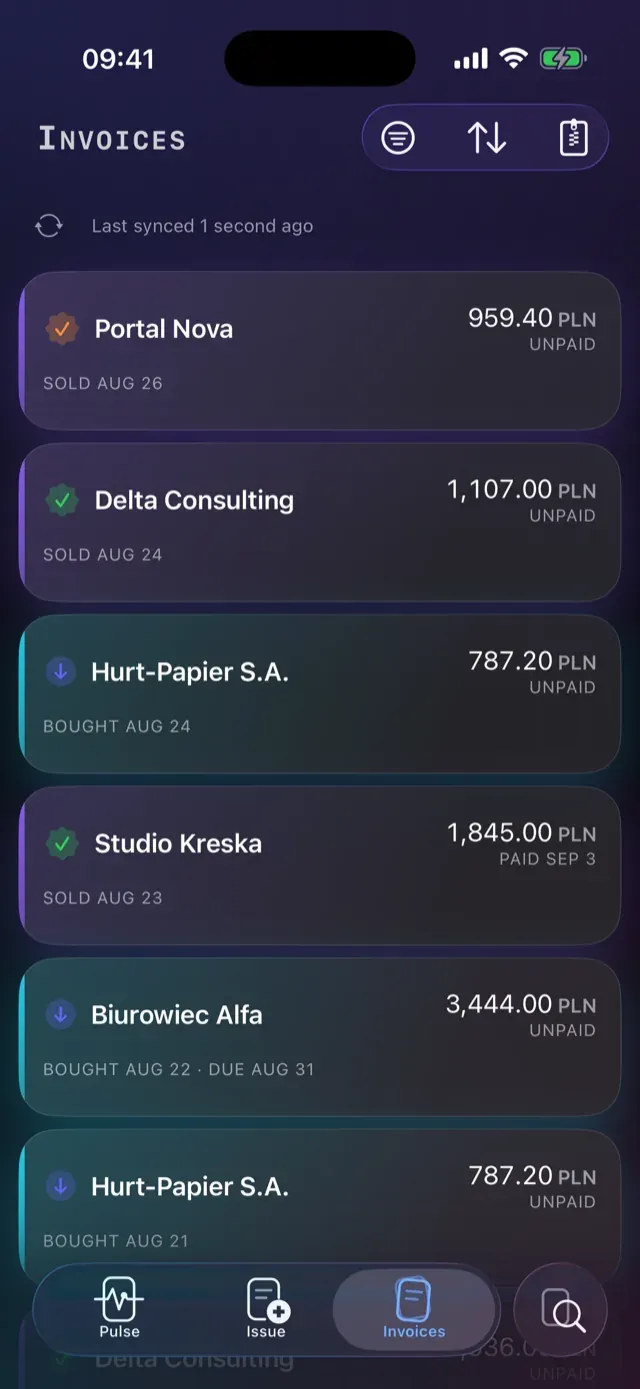
Purchase invoices download in the background. The notification says who from and how much — or says nothing about the detail, if that is how you set it on this device. Tapping it switches company and opens the document.
Accept it or don’t.One swipe.
Every purchase waits for your verdict. Swipe right to accept; swipe left for the box where you write down why not. The decision is saved at once and travels to your other devices. It is yours alone — KSeF and the seller are never told.
04
Pulse
Your whole business.One glance.
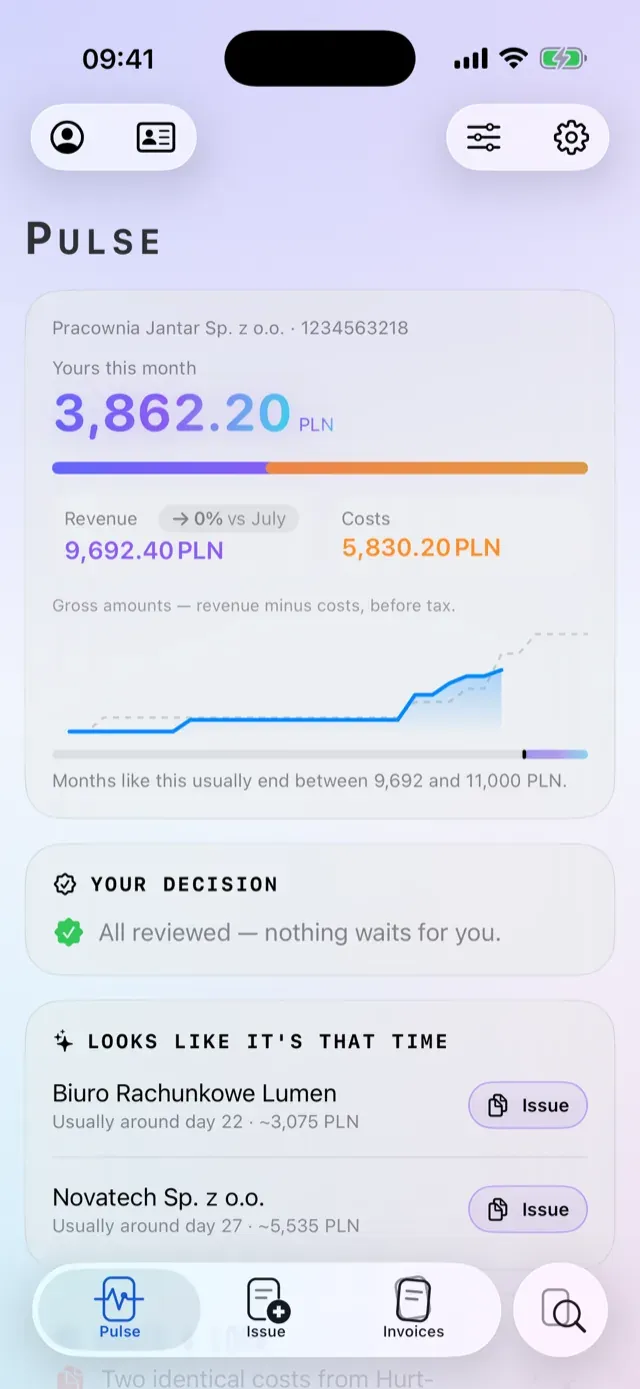
The Pulse opens on a pinned Brief: the month’s result, revenue and costs, on a counter that rolls into place like an odometer. Below it are cards you arrange and hide yourself — and the arrangement follows you to the next device.
- Sales issued and accepted by KSeF
- Purchases received from your suppliers
Violet is a sale, cyan is a purchase — the same two colours as in the app, and the only two on this page.
The Pulse cards
- Acceptance queue
- Receivables — three views
- Due this week
- VAT-o-meter
- Income-tax advance
- 30-day liquidity (Pro)
- Anomaly feed (Pro)
- White-list guardian (Pro)
- Recurring-invoice radar
- Client payment rhythm
- Revenue concentration
- 13-month comparison
- Accountant package
- Records rooms
The Brief has six styles. The month’s outlook stays silent when the history is too short, instead of inventing a figure.
05
Payments
Paid at the counter.Booked on the spot.
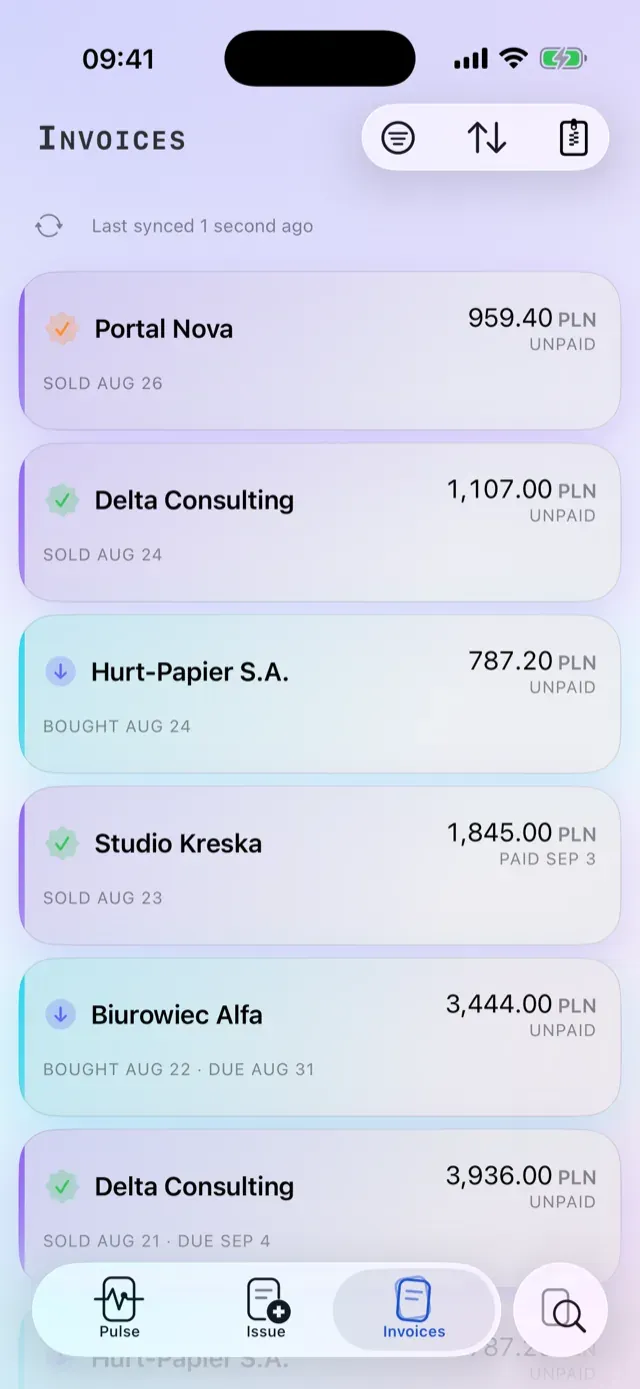
You send one link — it takes cards, Apple Pay and BLIK — and the same QR code is printed on the invoice PDF. At the counter a customer can read out a BLIK code with the amount on screen. The payment confirmation is set by the same press that prints the invoice.
You don’t mark it paid.It marks itself.
When the money actually lands, the invoice closes itself as paid server-side and the fact reaches every device you own. Ksefly never stamps it in advance. No small print on the commission either: Stripe’s own rate plus 1.00% on Free, 0.35% on Pro, or 0.20% on Ultra.
The collection rules
- An invoice can be collected exactly once; a second attempt is refused.
- An invoice superseded by a correction stops being payable and its link expires.
- Split-payment invoices stay off the card rails.
- A link lives 24 hours, and retires itself the moment it stops being current.
How accepting payments works
Who is who, how the money flows, what it costs
See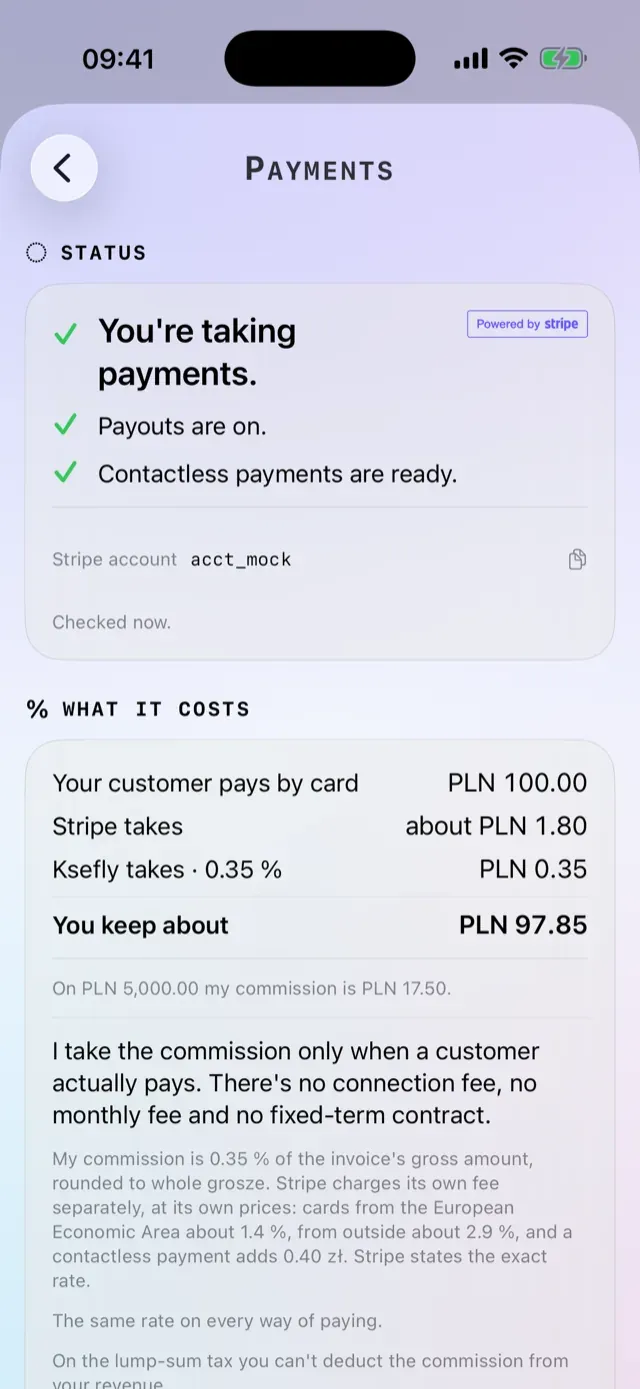
06
Document
UPO, XML and PDF.In black and white.
The KSeF number, the official acknowledgement of receipt and the source XML sit beside every invoice. The client’s PDF comes in four layouts, with both parties’ addresses, a per-rate VAT table, the statutory annotations in the exact wording the law prescribes, and the KSeF verification QR code with the KSeF number printed beneath it.
Your logo.Your letterhead.
You choose the look once, per company: layout, accent colour, your own logo, the document’s language and the line you close an invoice with. Ksefly Ultra also takes our mark out of the footer. The finished PDF goes out by email straight from the app, with your message template and your signature.
07
Bookkeeping
The month closes.Your accountant has everything.
One tap builds the package: a PDF summary with the VAT balance and a per-rate table, the sales and purchase registers as CSV that Polish Excel opens correctly, and a separate VAT sheet. You can add your own notes on purchases, and whatever KSeF rejected, each with its reason.
08
Trust
No signal.No difference.
You can issue with no connection at all. The number is reserved the moment the invoice is queued, it waits under an amber seal, and it sends itself when the network comes back. A submission key makes a retry a replay, never a second invoice.
Lose the phone.Keep the business.
Your contractor book, product catalogue, bank accounts, numbering, taxation form, invoice look and Pulse layout are written to an encrypted vault the moment you make them. The vault is ours to hold — a backup that never left the phone could not survive the phone — and what lies in it is an encrypted parcel we open for one thing only, the thing you ask us for: with details switched on, a notification names a counterparty the way you named them, not the way the register did.
Your profile is built on your phone.We keep no copy.
Ksefly Intelligence is off until you turn it on. Your business profile is built on the device and is never stored on our servers: when you ask for the Brief’s line, it passes through our server to the model for as long as writing that one sentence takes. The part of the server that does it has no database to write to — transit is not storage. And every figure the model writes is checked against the figures it was given; a sentence that invents one is thrown away.
09
Search
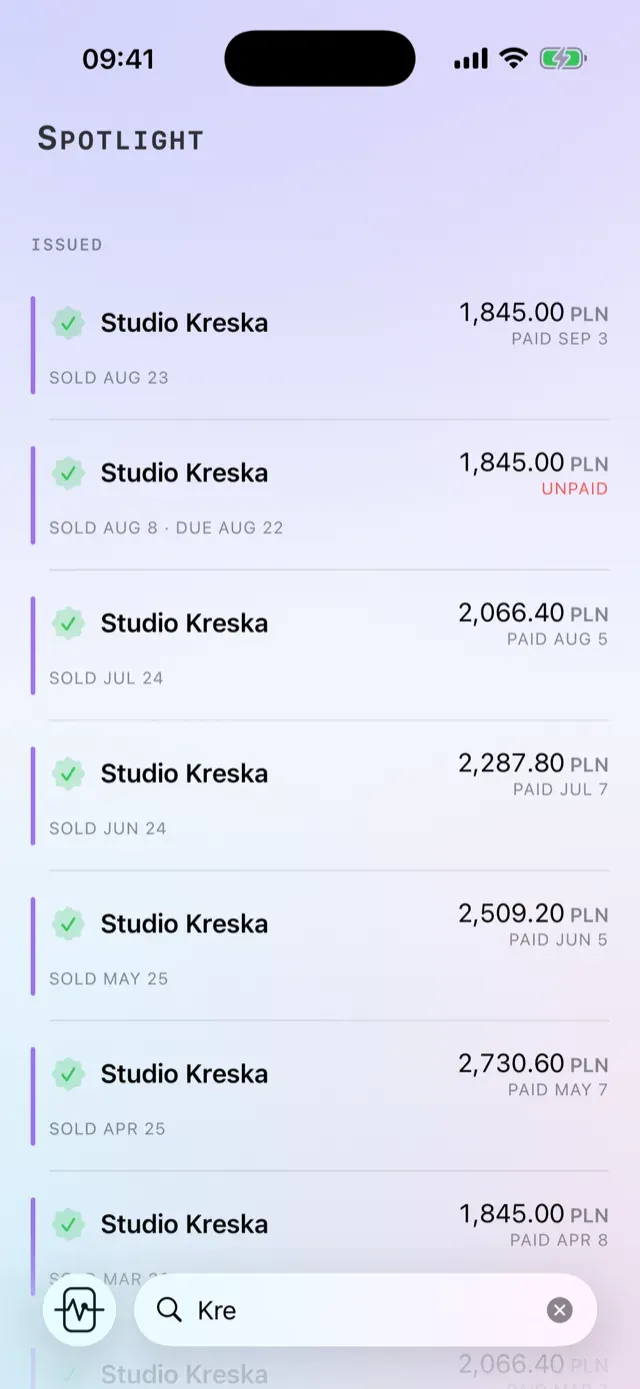
Type three letters.There it is.
One query searches invoices, contractors, products, bank accounts and your own companies, and every result opens its natural screen. Ksefly Ultra adds live registry search: type a NIP and the business register, the VAT white list and VIES answer as one card — registered name, address, VAT status, activity codes and the bank accounts on the white list.
10
Companies
Several companies.One phone.
One account carries several companies, each with its own books, numbering, accounts and invoice look. The switcher sits on the Pulse, and a separate owner’s room adds up the result across all of them.
11
Plans
Three plans.No small print.
13,99 zł
That is Ksefly Pro for a month. Paying for the year gets you two months free.
| Plan | Monthly | Yearly | Invoices |
|---|---|---|---|
| Free | 0 zł | — | 5 / month |
| Ksefly Pro | 13,99 zł | 139,99 zł | 15 / month |
| Ksefly Ultra | 25,99 zł | 259,99 zł | unlimited |
On money collected through the app: Stripe’s own rate plus 1.00% on Free, 0.35% on Pro, or 0.20% on Ultra.
Pro adds
- A second company on the same account
- 15 invoices a month instead of 5
- Scheduled sending
- Live registry search — GUS, the VAT white list and VIES as one answer
- Ksefly Intelligence — AI-written invoice gists and the Pulse sentence, with your consent
- A lower payment commission — 0.35% instead of 1.00%
Ultra adds
- Unlimited companies and invoices
- Your logo on the invoice, and the Ksefly mark removed from its footer
- An AI-drafted booking note
- The lowest payment commission — 0.20%
Allowances and corrections
- The allowance counts sales invoices issued in the month.
- Corrections never take a place in it.
- A correction to zero returns the original’s place — once KSeF accepts it.
- You change or cancel a plan in the App Store, not with us.
12
Questions
You ask.We answer.
-
Is Ksefly the official KSeF app?
No. Ksefly is an independent third-party application and is not affiliated with, sponsored by or endorsed by the Polish Ministry of Finance, the National Revenue Administration or any other government body. It uses the public KSeF API that is published for software integrators, and the name KSeF is used descriptively only — to say what the app is for.
-
How do I sign in?
With Apple. That is the only front door. You connect a company separately and only once — with a KSeF token, a Trusted Profile or a qualified certificate. Face ID locks the app; it is not the way in.
-
What does Ksefly cost?
Free — nothing, and 5 / month. Ksefly Pro — 13,99 zł a month or 139,99 zł a year. Ksefly Ultra — 25,99 zł a month or 259,99 zł a year. Both paid plans are on sale today. On money you collect through the app there is a commission: Stripe’s own rate plus 1.00% on Free, 0.35% on Pro, or 0.20% on Ultra.
-
What happens if I lose my phone?
Nothing you cannot get back. Your contractor book, product catalogue, bank accounts, numbering, invoice look and Pulse layout are written the moment you make them to an encrypted vault on our side, and they come back when you reinstall. The invoices themselves live in KSeF anyway.
-
Can my client pay from the invoice?
Yes. You send one link that takes cards, Apple Pay and BLIK, and the same QR code is printed on the invoice PDF. When the money actually lands, the invoice closes itself as paid — server-side, not on your screen.
-
Does Ksefly read my invoices or sell my data?
We process only what running the service requires: your invoices and the company details needed to talk to KSeF. We do not sell data, we show no advertising, and we do not track you across other apps or websites.